
So, you want to jump straight into automating an area of your business? After all, if you get it automated, it’s one less thing for your team to do. I clearly love automating business and marketing processes, but I’m also going to be the first to say – not so fast. You could jump straight into automating, but it’s a bit like building a house before an architect does the drawings.
There are a few things that should happen before you automate a process.
- Do it manually first
- Map out the process
- Identify areas to automate
- Automate what you defined in step 3
Most people start at step 4. Savvy businesses go through all 4 steps.
Do it manually
You probably think it’s weird for an automation consultant to advise you to do something manually. But often the best automated systems started out as optimised manual systems first.
With automation, it’s tempting to implement it too soon. Especially if you’re eager to save time and energy, and wanting to scale your business quickly. But systems need to be tried and tested, and in manual mode, this is when you’ll find it easier to notice what’s working, what isn’t and where you can improve.
Taking the time early on, helps to refine your workflow and identify the key important steps. Once you’ve got a good handle on your process, that’s when you bring in the automation – you’ll know exactly what you want to systemise leading to the most efficient and effective automated solution.
Map out the process
After you or your team have been manually running this process for a while, it’s time to map it out (known as process mapping). Process mapping is where you create a flow diagram of the major steps and decisions in your process, so that you can see at a glance what is happening.
Here’s an example of a really simple process map for manually dealing with enquiries from your website.

You can expand this and includes all the steps to when a lead goes from new enquiry to client.
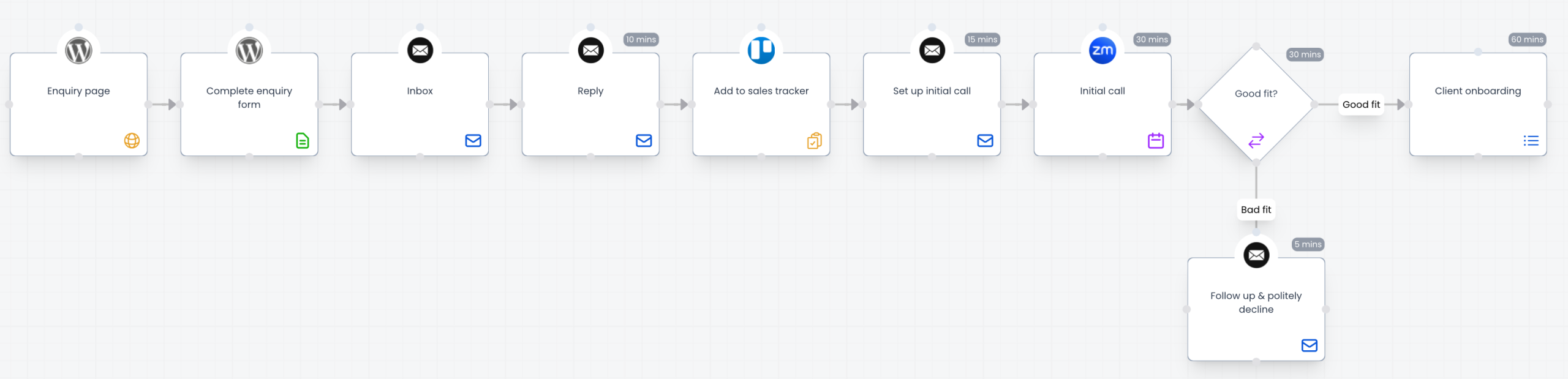
I’ve included an estimate for how long each manual step takes. You can then multiple this by the number of leads going through this per month, and an approximate hourly rate for each employee processing the step. This is incredibly useful for calculating the financial savings of adding automation.
Identify areas to automate
Now that you have everything mapped out, it’s time to improve the process. This usually happens in two ways.
- Identify steps that can be automated
- Identify ways to streamline the process
You could do this in either order, or sometimes at the same time, depending on the process.
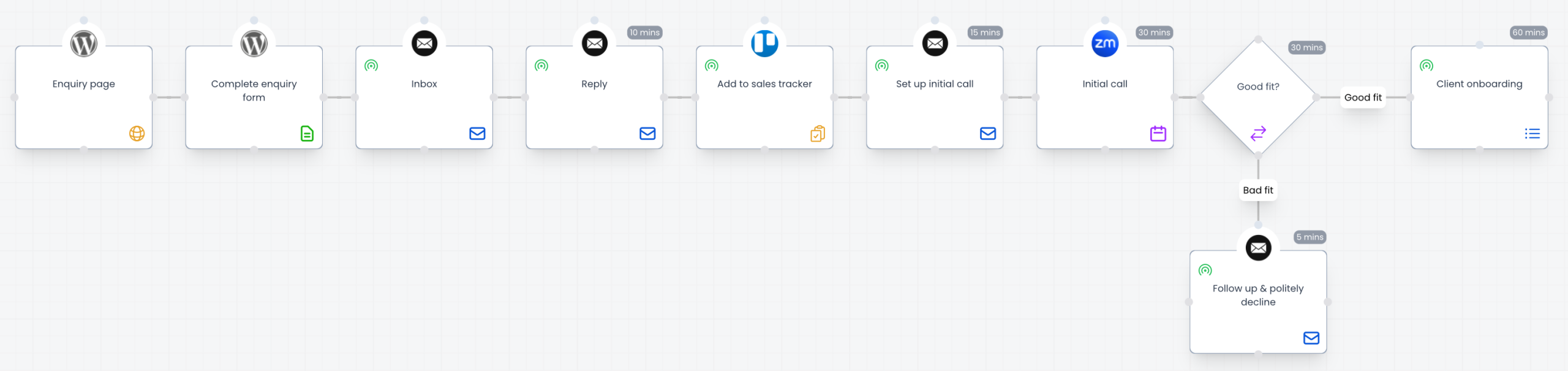
With the process we mapped out in the previous stage, I’ve added a symbol to indicate steps that can be partly or fully automated.
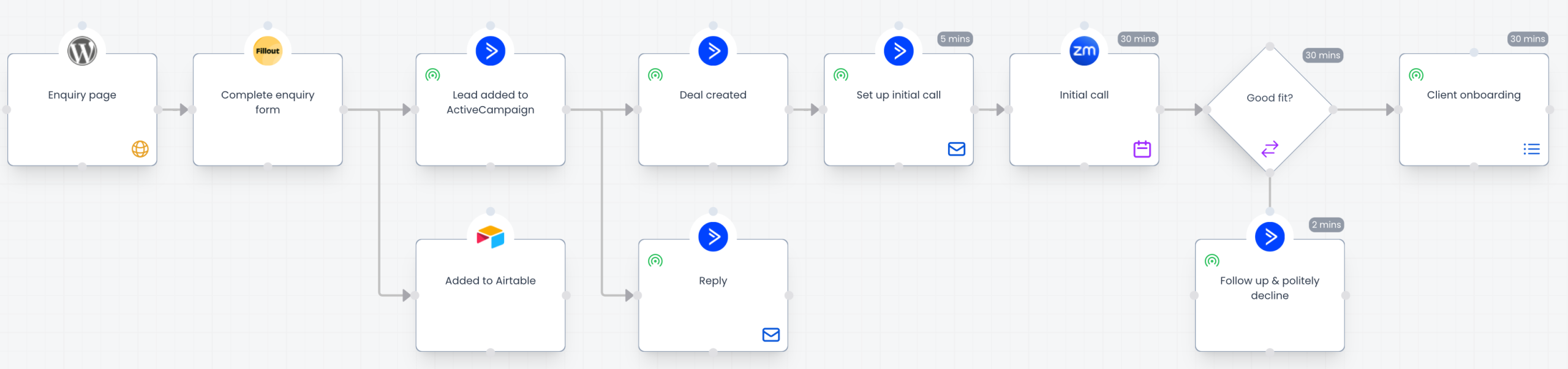
I could also drastically improve this process by adding two tools – Fillout and ActiveCampaign. Both of these tools will help automate the process further, and keep track of the leads.
This is what our enquiry process looks like with Fillout, Airtable and ActiveCampaign.
Automate
Now for the fun part! With the process mapped out, improvements found and opportunities to automate identified, it’s time to actually build the automated system.
You might be doing this in a workflow automation tool like Zapier or Make, in an email marketing tool like ActiveCampaign or Kit, form software like Fillout or any other tool that supports automation.
Having the process steps clearly mapped out is going to make the building of the automation much more efficient. You know exactly what you are trying to build before you start.
As you build, you may need to deviate from the plan if the tools don’t support it in the way you designed, and that’s fine. You can adjust your process map as you go, which will ensure your documentation reflects what you actually built. Having it documented and mapped out accurately will save countless headaches later on.
Do it yourself
I have used a purpose built tool called Puzzle to map out the processes you see above. You can use any digital whiteboard or flow diagramming tool, such as Miro or Whimsical (I love Whimsical!).
You could also do this with pen and paper. But the problem with paper it can be hard to get it right without the ability to move the shapes around a screen.
Here are a few tips if you want to do this for yourself:
- Start by mapping out the processes as they are. Don’t try and map out a future state that doesn’t exist yet
- Start on at the left with the first step in your process
- Then add the step that happens next
- Then add all the steps until you reach the end
- You don’t have to make it super detailed
Here’s a guide to what the shapes mean on a process map:
- Rectangle: a step in your process
- Diamond: a decision that needs to be made
- Arrow: the flow of movement from one step/decision to the next
Wrapping up
It’s easy to jump straight into automating your processes. But without first understanding what works and what doesn’t by doing it manually, and then mapping it out, it’s easy to end up automating the wrong thing. And when you go down that road, it’s hard to spot it once it’s automated.
It’s better to take your time to do it properly. If you are already running the process manually, start by mapping it out. If you aren’t even running it manually yet, it’s usually best to start there.
Automation is amazing and will free your team’s time and save you a lot of headaches. You just need to have a deep understanding of what you are automating first.
Marketing Automation Weekly
Each week I share a behind the scenes look at the real automated marketing systems I build for marketing teams.
You’ll get practical insights and examples on streaming marketing operations, getting data into the right systems and freeing up your team to do more creative work with the help of automation and AI.