
Some of my content starts mid-thought while I’m walking the dog. Most of it starts at my desk, a note I made during a project, a question a client asked or a problem I solved.
I want to use AI to make content creation easier, but never to replace me as the writer. Writing is a human-to-human medium. People want to read what other people have written, not robots.
But how do I use AI without letting it do the actual writing?
For me, it’s become a tool to identify content ideas from my own notes and help with the early process of turning them into content, while I do the actual writing, in my own words, from my own experience.
In this article I’m going to break down a method I’ve developed. I’m calling it “The Logbook Method”.
The daily notes habit
It all starts with daily notes. As I go through my day, I make notes on the projects I’ve worked on, the problems I’ve encountered, the problems I’ve solved, any questions or answers I’ve given, and anything else I think is useful to remember. I can jot down notes as I go, which is easier than trying to sort everything in my head.
I was doing this process anyway. If a client asks a question about something that was changed or a decision made, I can refer back to my daily notes. That’s the original reason I kept them, for working memory, not content.
Now it’s becoming the source of my content. I’ve built a content system using Claude Skills (more on this shortly) that takes those notes and turns them into content drafts. The words are my own; I’m doing the writing. Claude helps me organise my thoughts, acting as an assistant, not the creator.
For the daily notes, I use a tool called Reflect. Other apps like Obsidian and Craft also do daily notes, but Reflect is what I use.
If I’m considering a particular direction for my business or a problem, I make notes on that too. Anything worth saving goes in there: research, observations, decisions. Over time, it all adds up.
I do this as a matter of habit and have done so for quite a long time, even before this process.
Audio memos as the capture layer
If I’m out walking the dog and think of an idea, I can quickly take an audio note in Reflect and it will transcribe and save that into my daily notes. A lot of my content starts that way, not at a desk trying to write, but mid-thought during the day.
It doesn’t matter if I ramble. I just get as much out as I can.
Audio notes save a lot of time compared to typing. I could probably create an audio note in a quarter to half the time it takes to write it. Another advantage is that you can do it anywhere.
Audio notes also ensure that my words are in my own voice. When I speak, it is my voice, and with enough practice, the words will reflect how I talk to someone. This means the final content will be in my own voice, which is a great way to remain authentic.
Claude Skills
As mentioned above, the content system uses Claude Skills. Claude Skills are essentially a set of instructions, written in markdown files, that tell Claude how to do a specific task. This ensures it always does it in a consistent way, with the relevant context.
The skills I’m using for the content system include:
| Skill | Description |
|---|---|
| Weekly review | Reads through my daily notes since the last run and identifies moments worth turning into content |
| Fetch Transcript | Pulls an audio note from Reflect and saves it as a versioned markdown file |
| Fact Check | Reads a transcript, flags uncertain claims, notes anything missing, and suggests questions a reader might have |
| Article | Identifies the core argument and strongest sentences from my recordings, restructures them into a blog post draft |
| Same as Article but formats for a LinkedIn post | |
| Newsletter | Same as Article but formats for a newsletter email |
| YouTube Script | Same as Article but formats as a spoken script |
Weekly Review: From notes to content ideas
The Weekly Review Skill connects directly to Reflect using Reflect’s MCP server, reads through all my daily notes since the last time I ran it, and identifies moments worth turning into content.
For each idea, it produces a heading, a potential hook, a rough outline of three bullet points, the possible format (article, newsletter, LinkedIn post, or YouTube script), and a note on anything it thinks I might have missed. I have criteria for what counts as a good idea, which I can adjust over time. Everything gets saved into a Content Ideas folder, one file per weekly review.
I go through the file, usually three to five ideas, and pick one or two to develop further.
From idea to draft
For each idea I want to develop, I record an audio note: a brain dump of everything I can think of on that topic. A separate skill called fetch transcript pulls that out of Reflect and saves it as a versioned markdown file — V1.
I then run a fact-checking skill. It reads the transcript, flags any claims that are uncertain or unverified, notes anything that seems missing given the topic, and suggests questions a reader might have. I use that as a brief to record a second audio note — V2 — with additions or corrections.
From there, I decide what type of content this will be: an article, a LinkedIn post, a newsletter, or a YouTube script. I then run the matching skill. It identifies the core argument and the strongest sentences from both recordings, restructures them, and trims filler words and false starts while keeping my informal tone. If a section is thin, it flags it with a comment in the markdown rather than padding it out. The draft lands in a drafts folder, ready to open.
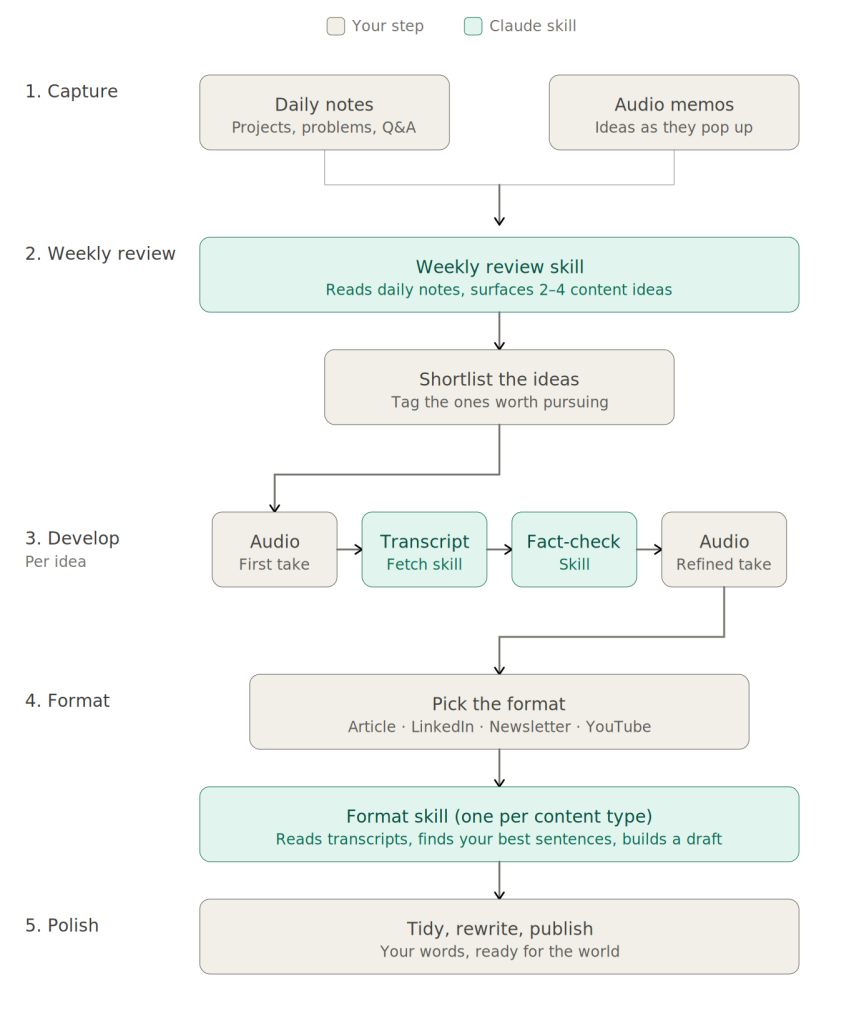
Still my words
The critical part is that it’s still my own words, taken from my voice recordings, with Claude acting as an assistant to speed up some manual tasks.
The format skill is instructed not to editorialize or change my words. It turns my rambling audio note into something more cohesive and structured. This becomes the first draft of the content, and the sentences are mine.
After the draft
I use Obsidian (a markdown editor) to do re-writing and final editing. I let the draft sit for a couple of days, then return to it: fleshing out anything missed, rewording what needs it.
After that I pass it to my wife, who is also my copy editor. She reads it, checks for grammatical correctness, and does some light editing.
Once that’s done it goes to its final destination:
- published on my website if it’s an article
- posted to LinkedIn
- or added to ActiveCampaign for my newsletter.
How long does it take?
The weekly review takes about five minutes to run, which includes connecting to Reflect and reading my daily notes.
Reviewing the ideas and recording voice notes takes around half an hour.
Fact-checking, recording the V2, and running the format skill takes anywhere from 15 minutes to an hour depending on the size of the piece.
And then the final edits can take half an hour to an hour, depending on the type of content it is.
So it is still a time investment, because creating content takes time. But it is less time than doing everything manually.
And more importantly, it turns it into a repeatable process, and for me, that is key. Running a repeatable process beats the writer’s block that comes from a blank screen every time.
Do what works for you
This setup is tailored to how I want to create content and the way I work. It’s centered on my daily notes, and audio notes. I was taking these notes anyway, and this process has allowed me to turn them into valuable content for my business.
But it doesn’t mean this exact process is right for you.
You can try parts of it, and I’d highly recommend trying the daily notes and weekly review process.
The important part is to think about how you want to create content, what’s best for your brain, and see where Claude can help.
What you need to set this up
I use Claude Code, which is aimed at developers and requires some comfort with the command line. If that’s not you, Claude Cowork allows a similar setup and you can run the same kind of skills there.
Claude costs $19 a month for the Pro plan, which is more than enough for this.
Reflect costs around $10 a month. You could use Obsidian, which is free.
Some notes apps have MCP servers and some don’t, which determines whether Claude can connect to them directly.
If you want to try something similar and want to talk it through, sign up for my newsletter and reply to one of my emails, or look at the coaching options on my services page.
Marketing Automation Weekly
Each week I share a behind the scenes look at the real automated marketing systems I build for marketing teams.
You’ll get practical insights and examples on streaming marketing operations, getting data into the right systems and freeing up your team to do more creative work with the help of automation and AI.